
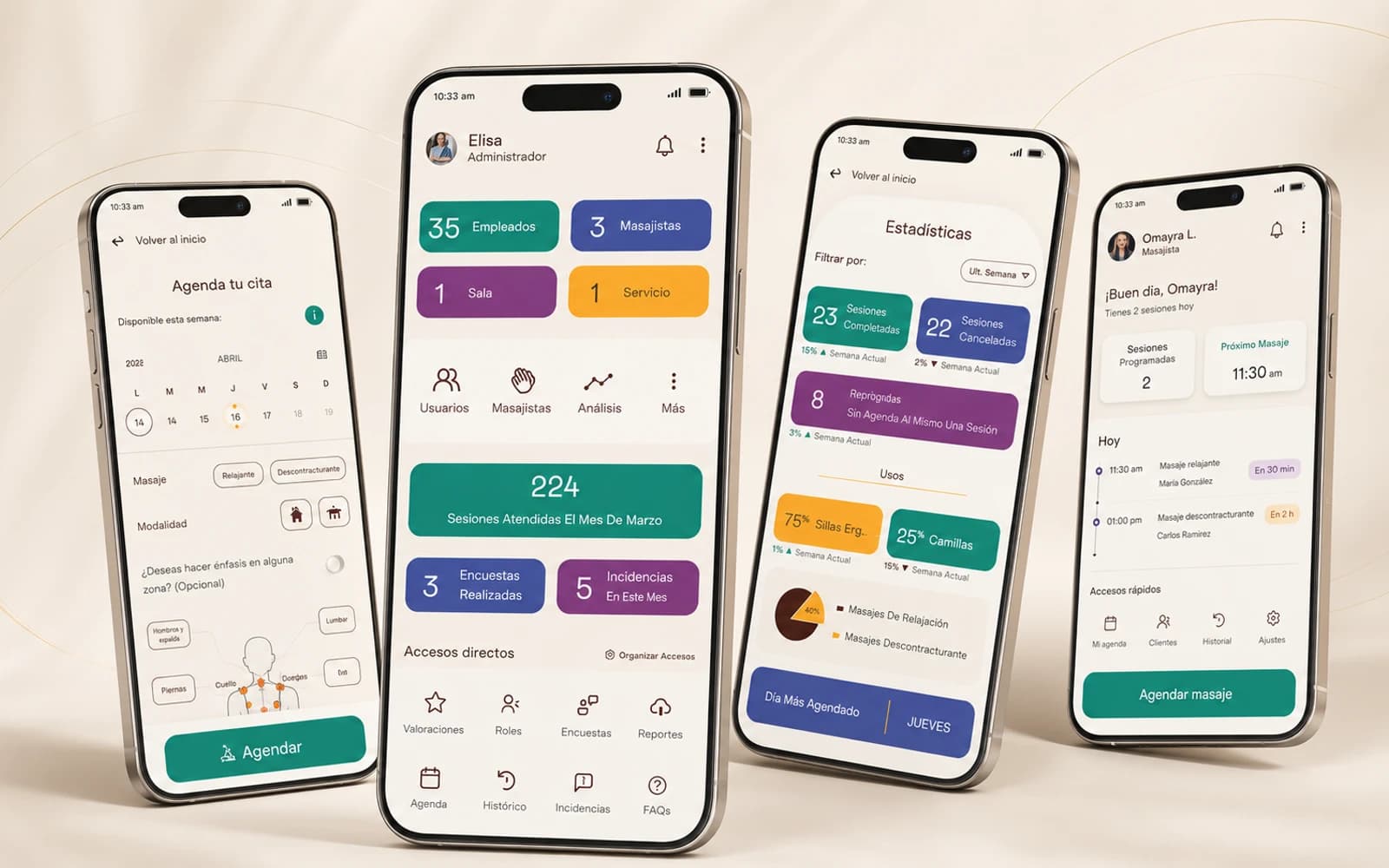
Homie Wellness Scheduling App
Mobile system to digitalize the booking and administration of internal wellness sessions.
- UX Research
- Design Thinking
- Mobile App
- Prototyping
- HR Experience
- Product Design
- RoleUX/UI Designer
- TypeUX/UI Challenge
- SectorHR / Employee Experience
- MethodologyDesign Thinking
- PlatformMobile App
From a sheet of paper to an organized digital experience.
The project started from a manual process: employees had to sign up on a physical sheet to book massage sessions offered as an internal benefit. The proposed solution was a mobile application capable of organizing slot booking, supporting HR administration and providing visibility to the external professionals involved.
- ProblemManual slot management
- UsersEmployees, HR and therapists
- SolutionBooking and admin mobile app
- OutcomeFunctional prototype of the main flow
The problem
Homie wanted to offer 15-minute massage sessions, twice a week, as a benefit for employees. The booking process relied on a paper sheet placed every morning at the massage room door, which led to low visibility, operational friction and lack of control over slot administration.
- Lack of visibility over available time slots.
- Dependence on a physical sheet to book.
- Difficulty tracking frequency and attendance.
- Little clarity for HR on benefit usage.
- No tools for external professionals.
Users involved
Employees
People who want to book a session quickly and comfortably, without walking around the office to check availability.
HR team
Responsible for administering the benefit, controlling slots, usage frequency, attendance and the relationship with external professionals.
External professionals
Masseurs or therapists who need to know their sessions for the day and serve each person in an orderly way.
Main pain points
- Needed a more comfortable way to book.
- Wanted to avoid moving between floors just to sign up.
- Needed to better organize their time.
- Wanted to take care of their physical and mental well-being.
- Needed to monitor sessions and attendance.
- Needed to control that employees did not exceed limits.
- Required more visibility over benefit usage.
- Had to coordinate external staff.
- Needed to know their sessions for the day.
- Required serving each session on time.
- Needed clarity about relevant information for each appointment.
Design challenge
The challenge was not only digitalizing a sheet of paper, but designing an experience that connected the needs of three types of users and allowed administering an internal benefit in a clear, organized and scalable way.
- Question 01
How could employees book massage sessions effectively?
- Question 02
How could HR manage and monitor sessions for employees and external users?
- Question 03
How could the professional handle each session on time and in an organized way?
How I approached it
- Step 01
Empathize
I identified the main actors of the system and gathered the key points of the brief to understand each user's initial needs.
- Step 02
Define
I organized pain points by user type and turned the detected needs into actionable design questions.
- Step 03
Ideate
I ran a brainstorming phase to explore possible features, flows and improvement opportunities.
- Step 04
Prototype
I turned the main ideas into sketches and mobile screens, prioritizing the most relevant flows for booking, administration and tracking.
- Step 05
Validate
I reviewed the proposal with a simulated stakeholder to gather feedback, adjust roles, rethink needs and improve the final proposal.
Proposed solution
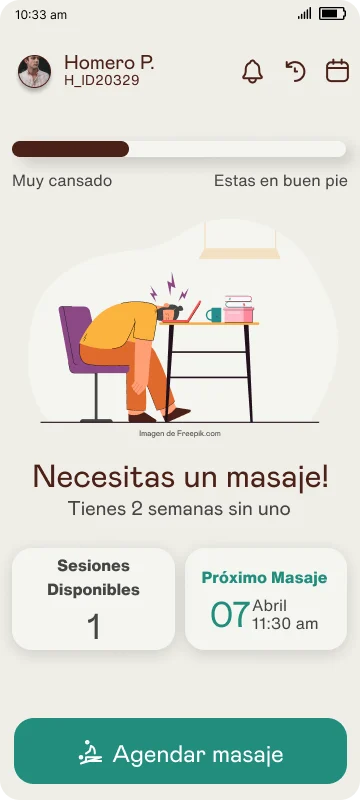
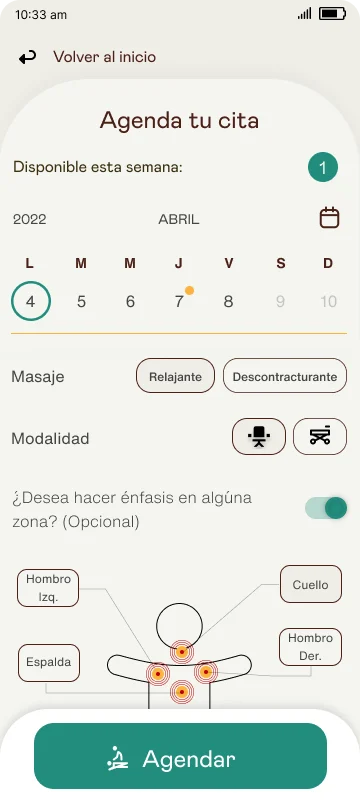
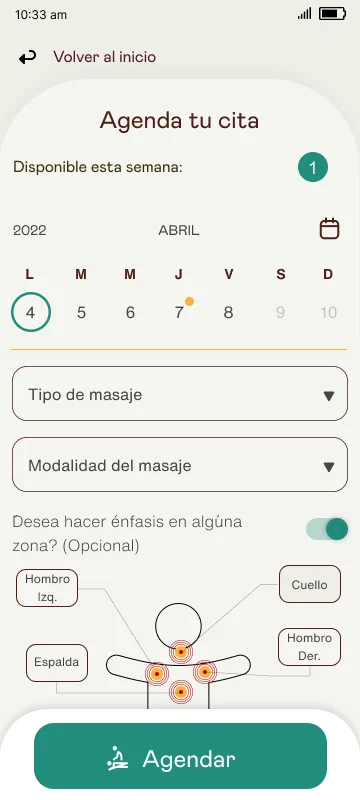
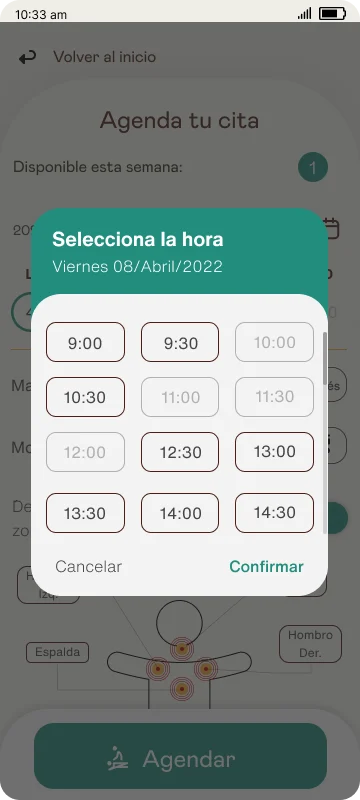
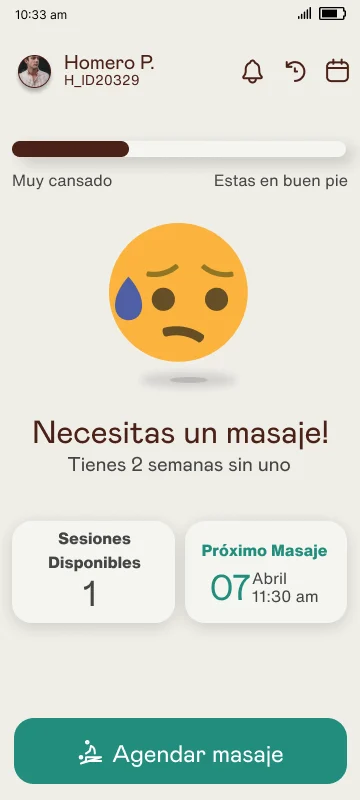
The solution was a mobile application with differentiated experiences per user type: employees, HR team and external professionals. The app allows booking sessions, checking availability, managing schedules, reviewing analytics and accessing relevant information for each appointment.
- Session booking
- Calendar and availability
- HR admin panel
- Usage analytics
- External professional management
- Appointment detail
- Menu and quick access
Design decisions
- Separate the experience by role to reduce complexity.
- Prioritize the booking flow as the main action.
- Use cards to quickly present key information.
- Include analytics so HR could monitor benefit usage.
- Design states and quick actions to improve navigation.
- Allow adjustments after feedback to reflect more realistic scenarios.
Validation and iteration
During the validation stage, feedback helped to adjust the initial approach. Some terms were redefined, external user needs were reconsidered, and more specific ideas about metrics for the HR team were incorporated.
- Adjustment of roles within the HR team.
- Shift in concept from physiotherapists to masseurs.
- Removal of needs not aligned with the type of benefit.
- New metric ideas for HR.
- Final prototype refinements based on the feedback received.
Tools and technologies
- Figma
- Design Thinking
- Prototyping
- UX Research
Outcome
- High fidelityMobile prototype
- 3 profilesUsers considered
- Design ThinkingMethodology
- Main flows definedOutcome
Prototype gallery
 Abrir imagen
 Abrir imagen
 Abrir imagen
 Abrir imagen
 +9Ver todas
Download the full case study
If you want to dive deeper, download the full PDF case study with all the detail of the UX/UI challenge developed for Homie Mexico.
Learnings
This challenge reinforced the importance of understanding every role involved before designing screens. An effective internal solution must not only solve the main action but also generate visibility, control and traceability for those who administer the process.
- An internal benefit also needs product design.
- Digitalization must solve real friction, not just replace paper.
- Separating roles helps reduce complexity.
- Metrics are key for HR to understand benefit usage.
- Early validation lets you correct assumptions.
Project developed as a UX/UI challenge. Some visual resources were adapted for portfolio presentation.
Want to see how I apply this approach to other products?
Write me and tell me what you have in mind. I work with teams of any size to build digital solutions that generate real impact.